Position lifecycle
Binquant owns trade entry decisions, while binbot’s streaming service manages open positions through shared and strategy-specific lifecycle policies. See Position lifecycle architecture for the component flow, strategy-matching contract, and extension guidelines.
staging-binbot home staging infrastructure
staging-binbot runs on a Windows home server (DESKTOP-MKOTSE4) with Docker Desktop and WSL2 Ubuntu. Tailscale provides remote administration and deployment access, while Proton VPN provides Canadian internet egress for the worker services. The diagram below describes the home deployment, whose Docker Compose stack lives at /var/www/terminal.binbot.in inside WSL; the repository’s local compose.yml is a separate development configuration.
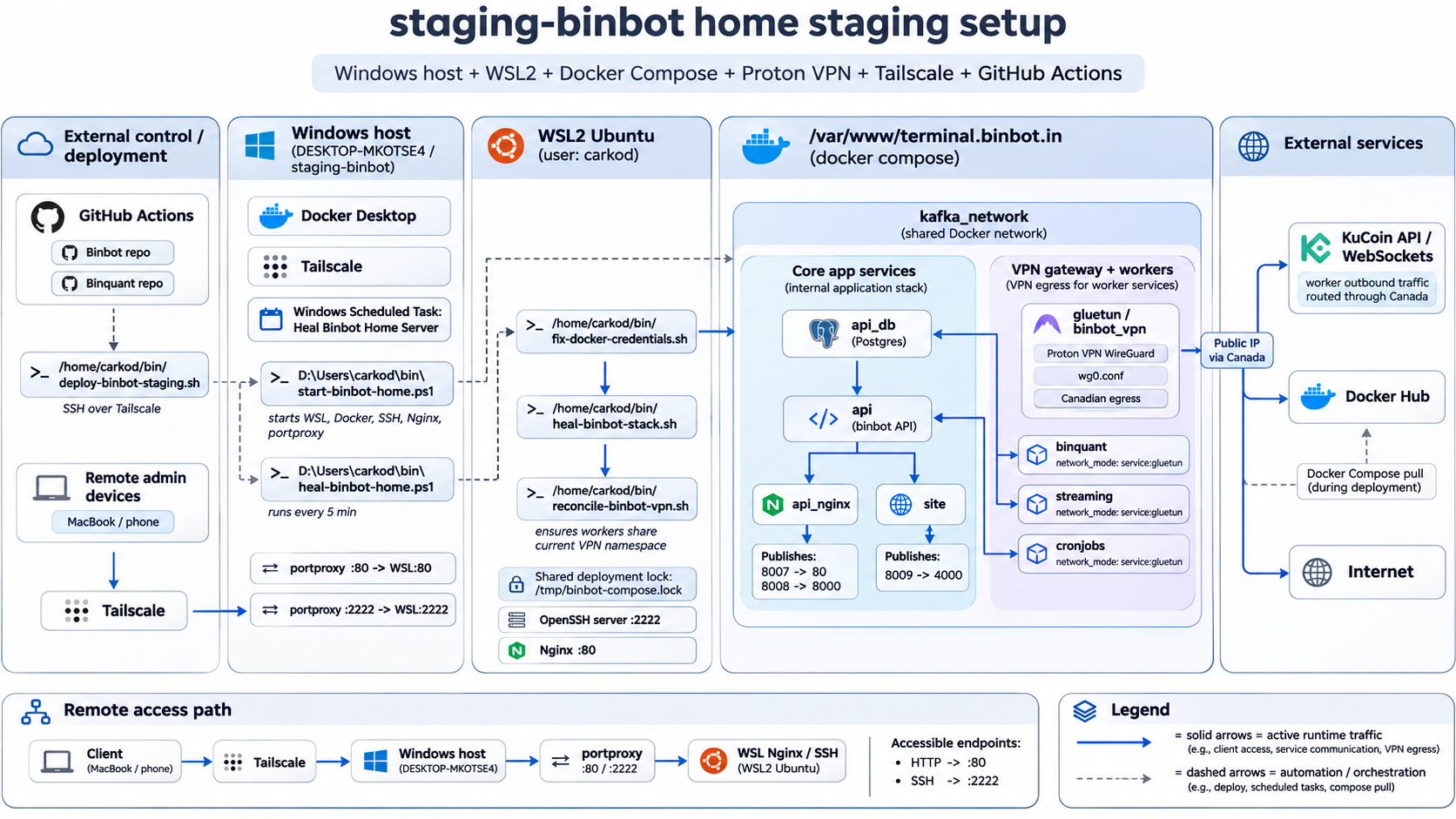
Solid blue arrows show runtime traffic, including remote access, service communication, and VPN egress. Dashed grey arrows show deployment and recovery automation, including image pulls.
Host and remote access
Windows runs Docker Desktop and Tailscale. Remote devices join Tailscale and reach the Windows host, which forwards TCP traffic into WSL using portproxy:
| Windows port | WSL destination | Purpose |
|---|---|---|
80 | Nginx on port 80 | HTTP access to the staging applications. |
2222 | OpenSSH on port 2222 | SSH administration and automated deployment as carkod. |
The remote access path is client → Tailscale → Windows host → portproxy → WSL Nginx or SSH. The terminal uses the same-origin /api base URL when opened at http://staging-binbot, keeping dashboard requests on the HTTP access path.
Compose services and VPN routing
The stack uses the shared Docker network kafka_network. Its core services are api_db (PostgreSQL), api (the binbot FastAPI backend), api_nginx (the dashboard and API proxy), and site (the brochure site). The API uses PostgreSQL for application state, and the dashboard and brochure site consume the API.
| Service | Published port mapping | Purpose |
|---|---|---|
api_nginx | 8007:80 | Terminal dashboard. |
api_nginx | 8008:8000 | API proxy. |
site | 8009:4000 | Brochure site. |
These Compose ports are separate from the Windows-to-WSL forwarding above. WSL Nginx provides the HTTP entry point on port 80.
The gluetun service, shown as gluetun / binbot_vpn, runs Proton VPN WireGuard using wg0.conf with Canadian egress. binquant (signals and bot updates), streaming (open-position management and public futures CVD collection), and cronjobs (scheduled work) each use network_mode: service:gluetun. They share the VPN gateway’s network namespace, reach the API and database through the shared Docker network, and send outbound KuCoin API, WebSocket, and other internet traffic through the Canadian public IP.
Docker Compose pulls deployment images from Docker Hub. This is a host-side deployment operation, separate from the workers’ VPN traffic.
Deployment and automatic recovery
GitHub Actions in the binbot and binquant repositories deploy over Tailscale and SSH through /home/carkod/bin/deploy-binbot-staging.sh. The binbot staging deployment job runs after its service images have been built and pushed to Docker Hub, connects to Tailscale, and invokes that script over SSH on port 2222.
The home server also has a recovery chain spanning Windows and WSL:
| Script or task | Responsibility |
|---|---|
D:\Users\carkod\bin\start-binbot-home.ps1 | Starts WSL, Docker, SSH, Nginx, and port forwarding. |
Windows scheduled task Heal Binbot Home Server | Runs D:\Users\carkod\bin\heal-binbot-home.ps1 every five minutes. |
/home/carkod/bin/fix-docker-credentials.sh | Repairs Docker credentials in WSL. |
/home/carkod/bin/heal-binbot-stack.sh | Heals the Compose stack. |
/home/carkod/bin/reconcile-binbot-vpn.sh | Ensures workers share the current VPN network namespace. |
The WSL recovery sequence runs credential repair, stack healing, then VPN reconciliation. Deployment and recovery operations share /tmp/binbot-compose.lock to serialize changes to the Compose stack. Reconciling the workers with the current VPN namespace keeps their routing aligned after the gateway is replaced.
Database
The new PostgreSQL database introduced a new architecture to the whole API ecosystem. It is based on the FastAPI full stack template.
API layer is now separated from databases. On one hand this is to allow the possibility in the future to release staggered API versions that can work independently. E.g. /api/api_v1 /api/api_v2…
On the other hand, the data provided by the Rest API does not have to correspond 1to1 to the data in the Database. At this stage, 2 databases are used, the MongoDB instance serves Big data, that most of the time its unstructure, like candlesticks, because these are indexed by timestamp. However the SQL database is structure data that has matured and is consumed by applications that require performance and a structure.
This separation gives us the flexibility to release API changes independently of what database source we use.
PostgreSQL table relationships
This diagram is a snapshot from before CVD history was added. The current schema is defined by the SQLModel tables and Alembic migrations. The diagram shows key columns only. A line represents a declared foreign key; o means the relationship is optional and a crow’s foot means many rows are allowed.
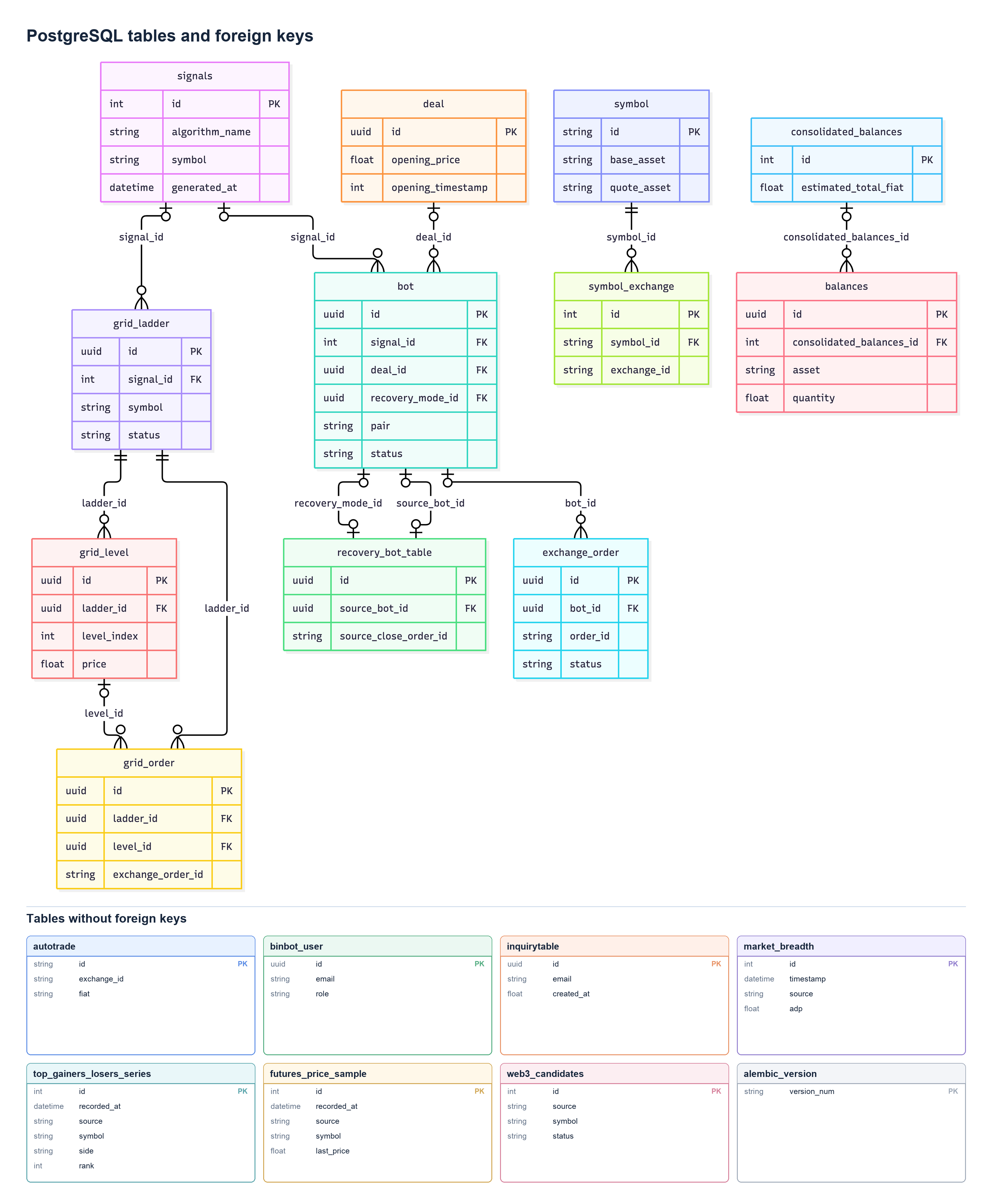
The two links between bot and recovery_bot_table use different foreign keys: bot.recovery_mode_id points to its recovery parameters, while recovery_bot_table.source_bot_id points back to a source bot. Both columns are nullable and unique. bot.deal_id is nullable but is not unique in the database, even though the ORM treats the deal as a single object. Symbols in signals, bots, grid ladders, and market samples are strings, not foreign keys to symbol. Likewise, grid_order.exchange_order_id is an exchange identifier, not a foreign key to exchange_order.
Table usage and cleanup
Across the current API, streaming service, cron jobs, terminal, brochure site, and shared pybinbot client, every application table has an active code path:
| Tables | Current use |
|---|---|
bot, deal, exchange_order, recovery_bot_table, signals | Trading state, orders, recovery, and signal history. |
grid_ladder, grid_level, grid_order | Grid trading lifecycle and order tracking. |
symbol, symbol_exchange, autotrade | Exchange symbol metadata and trading settings. |
consolidated_balances, balances | Scheduled balance snapshots and portfolio history. |
market_breadth, top_gainers_losers_series, futures_price_sample | Market breadth for binquant strategies; hourly ranking timestamps and full registered-futures price snapshots for the dashboard’s seven-day gain/loss trend; price samples also support fastest movers. |
cvd_bucket, cvd_minute | See market-wide CVD storage and coverage. |
binbot_user, inquirytable, web3_candidates | Authentication, brochure site contact inquiries, and scheduled Web3 candidate ingestion/API. |
alembic_version | Alembic migration state; it must be retained. |
No current table is a safe deletion candidate based on code usage alone. Older tables for paper trading (paper_trading, fake_order, test_autotrade), staging balances (staging_balances, staging_consolidated_balances), and asset indexes (asset_index, symbol_index_link) already have removal migrations. The former top_gainers_losers table was renamed to top_gainers_losers_series.
This is a source-code audit, not a live database inventory: the configured PostgreSQL instance was unreachable during this review. Before removing a table from any deployment, compare its actual tables, row counts, dependencies, and Alembic revision with this schema.